Overview:
This guide covers how to initiate an interpreted call when you either do not want to contact the guardian or do not have their contact information.
Use Case Examples:
- Family is not in SIS yet, but needs an interpreter for enrollment conversations.
Placing an On-Demand Interpreted Call Without Guardian Contact
-
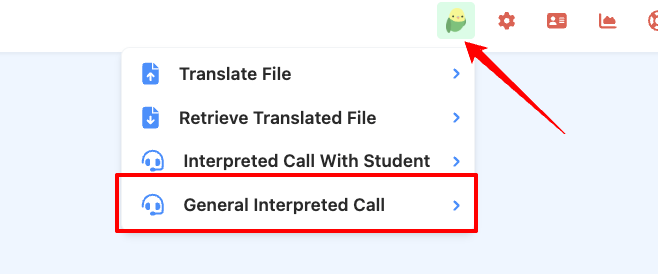
Log in to ReachMyTeach and go select the Lexikeet icon in the upper right and select general interpreted call
- Chose the language of interpretation you need
- Some languages may only be available for scheduled calls, not for on-demand calls.
-
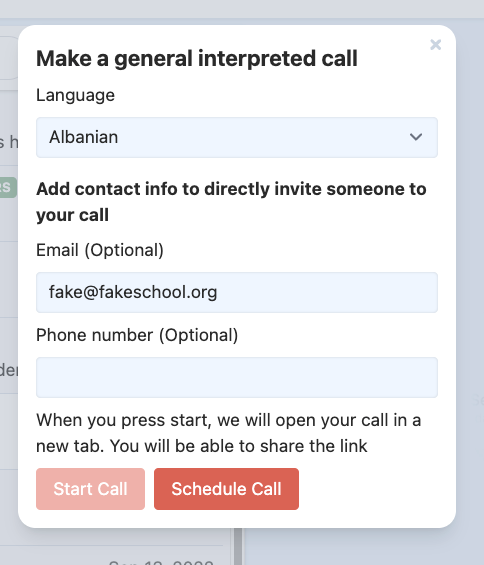
- If you would like to invite others to the call you can, this will send them an email/text with the link. If a family/staff isn't with you in person this could be one way to loop them in.
- Click Start Call—the system will connect you with an interpreter.
- Click Schedule Call - you will receive an email and Google Calendar invite for the conference.
To cancel these conferences:
- Email: dispatch@lexikeet.com
- Call: Lexikeet Customer Service at (844) 539-5338
Cancellations must be made at least 24 hours in advance to avoid charges.
Was this article helpful?
That’s Great!
Thank you for your feedback
Sorry! We couldn't be helpful
Thank you for your feedback
Feedback sent
We appreciate your effort and will try to fix the article