The Shared Guardian Inbox allows guardians connected to the same student to see each other’s messages and responses in ReachMyTeach.
Share Your Inbox
Log in to ReachMyTeach.
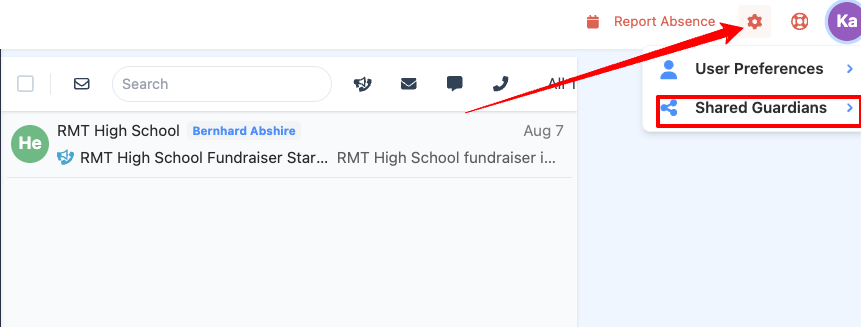
Open the Shared Guardian section under the gear icon in the upper right:
Select the guardian you want to share with.
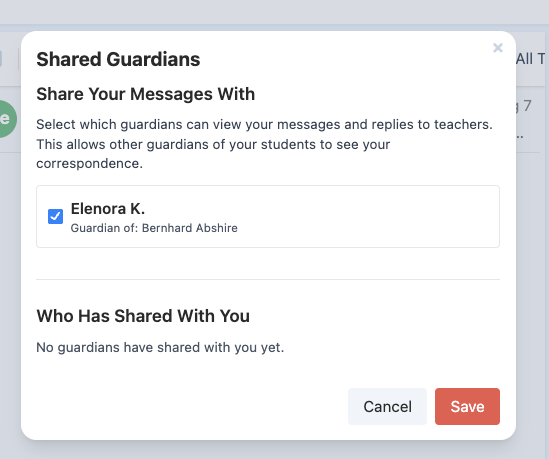
Choose Save.
The other guardian must also choose to share their inbox with you. Inbox sharing only works after both guardians agree to share. You will see your inbox has been shared in the lower section:
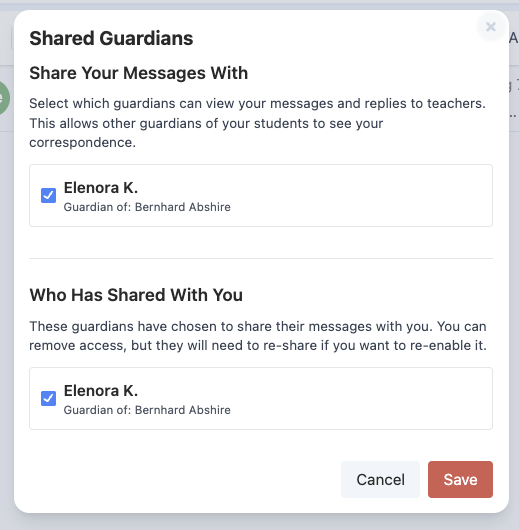
Once sharing is turned on both ways, each guardian can see messages and responses involving the other. This can help families coordinate and know when another guardian has already responded to the school.
You can stop sharing your inbox at any time from the Shared Guardian section.
Was this article helpful?
That’s Great!
Thank you for your feedback
Sorry! We couldn't be helpful
Thank you for your feedback
Feedback sent
We appreciate your effort and will try to fix the article