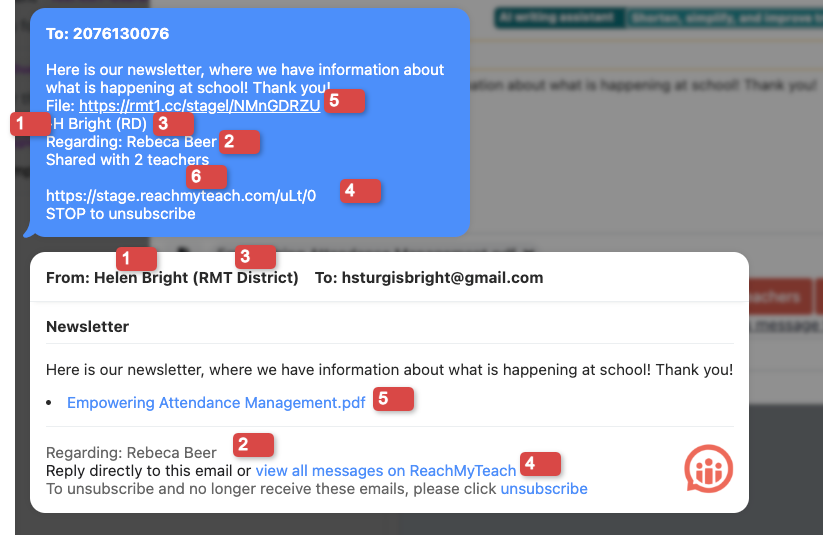
Messages will always have a few components when going to students and guardians. They have:
- Your name signed your name, unless it is a broadcast message.
- Who the message is regarding, so recipients which student the message is about.
- What school/class/group you teach with that student.
- A link for the recipient to click on to go to ReachMyTeach, but they also can respond to the message right in the email/text program.
- If there is a PDF a link to the PDF. For recipients that have a language other than English PDFs will be sent automatically in their preferred language.
- If the message is shared with other teachers, it will let the recipient know the message is shared.
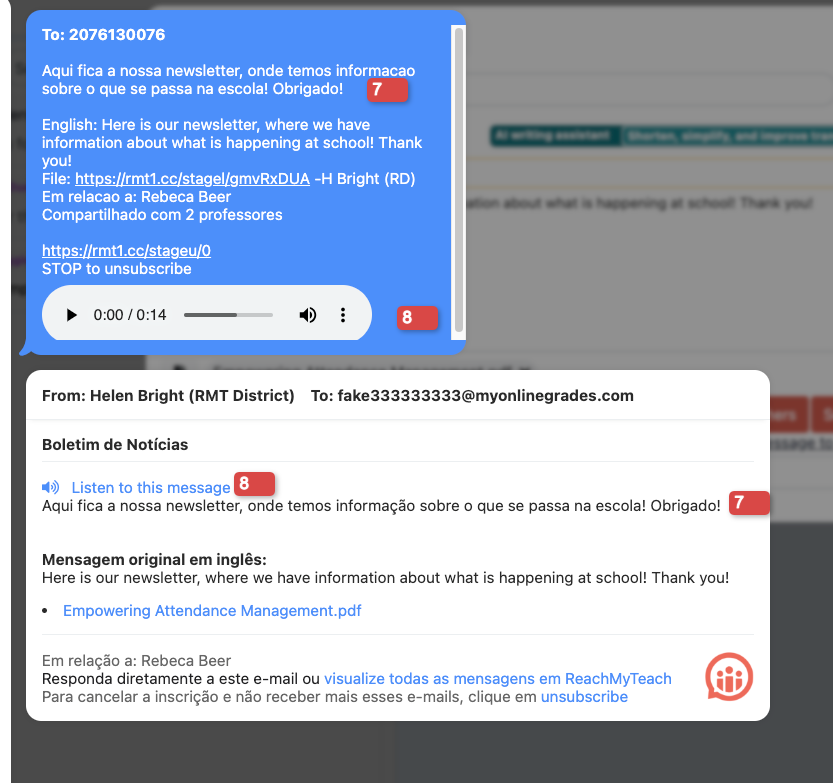
- If the message is translated the translated message will be first, then the English version.
- If Text-to-speech is turned on for a recipient they will be able to listen to the message as well, and respond with a voice memo.
Was this article helpful?
That’s Great!
Thank you for your feedback
Sorry! We couldn't be helpful
Thank you for your feedback
Feedback sent
We appreciate your effort and will try to fix the article