TEACHERS: Follow These Steps to Cancel an Upcoming Call with Guardians, Interpreters, or Invited Educators
? Important for Parents:
If you are a parent or guardian, contact your teacher as soon as possible to cancel the video call.
You can learn how to contact the teacher here or simply reply to a message (text/email) you've already received from them.
? Teachers: You must be logged into ReachMyTeach to cancel a conference.
-
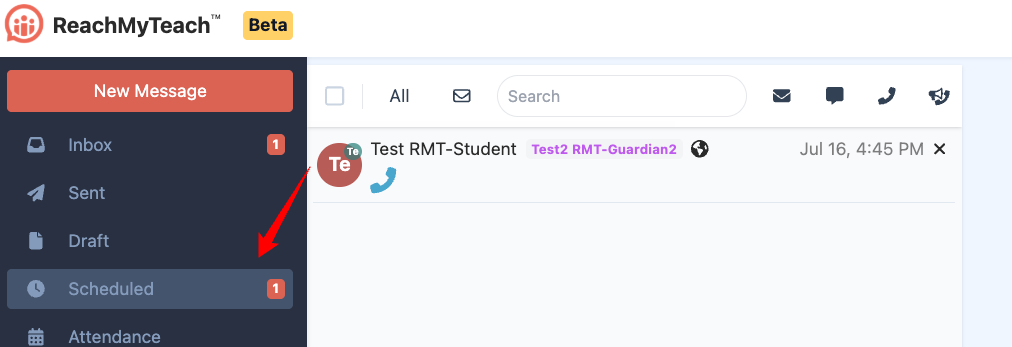
On the right side of your screen, under the "Scheduled" section, find the conference you want to cancel.
-
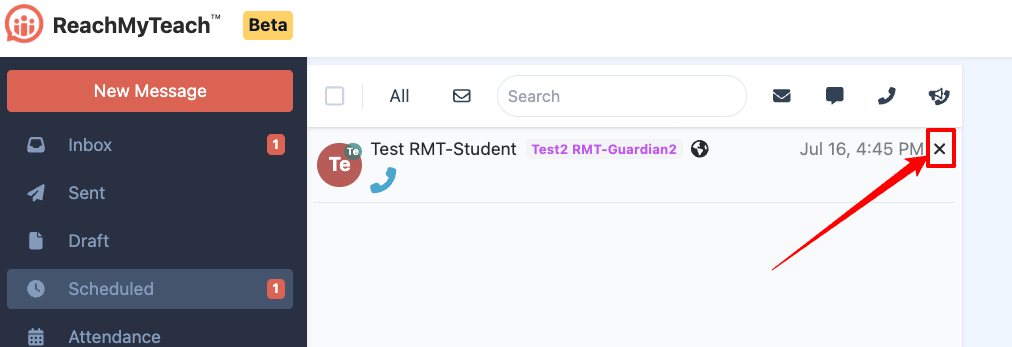
Click the cancel icon next to the conference.
-
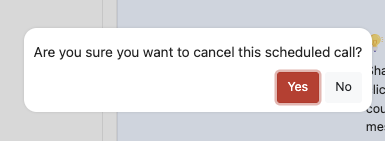
When prompted, select "Yes" to confirm the cancellation.
-
To reschedule, simply schedule a new call with the appropriate participants.
Was this article helpful?
That’s Great!
Thank you for your feedback
Sorry! We couldn't be helpful
Thank you for your feedback
Feedback sent
We appreciate your effort and will try to fix the article