Usage and Creating
One-Way Passes function similarly to regular passes, but they are intended for students who are going to a specific location and will not be returning.
To create a One-Way Pass, go to the My Students page or click the One-Way Pass button in the navigation bar under "Create Passes."
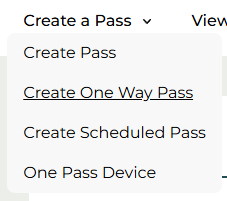
Next, click the "Create Pass" button, then open the dropdown menu and select "One-Way Pass."
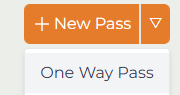
Both options will open the "Create a Pass" menu, allowing you to create a pass as usual. If you need assistance, you can refer to the "How to Create a Pass" guide for more details.
Please note, students are not able to create One-Way Passes.
Was this article helpful?
That’s Great!
Thank you for your feedback
Sorry! We couldn't be helpful
Thank you for your feedback
Feedback sent
We appreciate your effort and will try to fix the article