The Teachers page is a page for admins to see a list of all the teachers in the school and to quickly make them admins as well.
Table
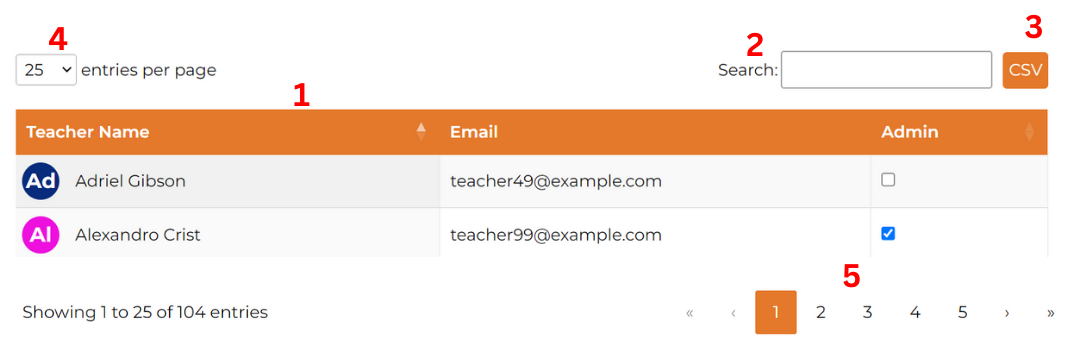
The table organizes and displays all teachers. The columns includes teacher name, email, and admin.
Features:
- Sorting: Click on the table headers to sort alphabetically by teacher name or admin status.
- Search: Use the search bar to find specific teachers by their name or email.
- CSV: Click the CSV button to download the current list of teachers.
- Entries per Page: By default, 25 teachers are shown per page. You can adjust this to display 10, 25, 50, or 100 teachers per page.
-
Change Page: If not all the teachers you want to view are visible on the current table, you can navigate through different pages using the controls at the bottom:
-
Double Arrow: Click to jump to the first or last page.

-
Single Arrow: Click to move forward or backward one page at a time.

-
Page Number: Click on a specific page number to jump directly to that page.

-
Highlighted Number: Shows the page you are currently on.

-
Double Arrow: Click to jump to the first or last page.
Interactive Elements:
- Links: Click on a teacher’s name to navigate to their statistics page.
- Making Admin: Check the check box to make a teacher an admin.
Was this article helpful?
That’s Great!
Thank you for your feedback
Sorry! We couldn't be helpful
Thank you for your feedback
Feedback sent
We appreciate your effort and will try to fix the article