When scheduling Parent-Teacher Conferences (PTCs), you have the flexibility to either assign on-staff interpreters or schedule a Lexikeet interpreter if your staff does not cover a specific language request. Here’s how to ensure seamless scheduling and assignment:
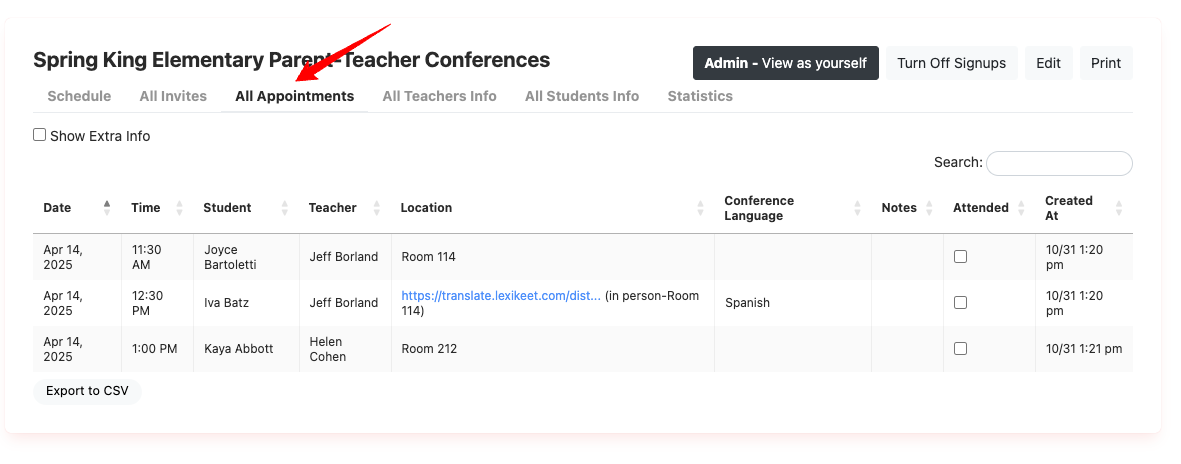
Begin by going to the All Appointments tab as an PTC admin:
Steps for Using On-Staff Interpreters
-
Designate On-Staff Interpreters as PTC Admins:
- Make sure all on-staff interpreters are set as PTC Admins within ReachMyTeach. This role gives them access to view and manage schedules, making it easier to organize their assignments.
-
Assign Interpreters to Conferences:
- When setting up a conference, add the interpreter’s name in the conference notes section. This helps staff know which interpreter is responsible for each session, ensuring smooth coordination.
Scheduling a Lexikeet Interpreter
Sometimes, a family may request a conference in a language not covered by your on-staff interpreters. In these cases, ReachMyTeach allows you to schedule a Lexikeet interpreter.
-
Select Lexikeet in the Interpreter Options:
- In the interpreter section of your PTC setup, choose Lexikeet if there is no on-staff interpreter available for the required language.

Was this article helpful?
That’s Great!
Thank you for your feedback
Sorry! We couldn't be helpful
Thank you for your feedback
Feedback sent
We appreciate your effort and will try to fix the article