If your interpreters are only going to be available for some conference times, you can designate that in RMT. You will edit your conference (it is not available on conference creation- just on edit afterwards on ML conferences) and update times that do not have interpreters.
To do this, go to your conference and click edit (in upper right).
Then, at the bottom there is a button Exclude ML Times - select that:

Now go through your times and checkbox any time that you would like to exclude.
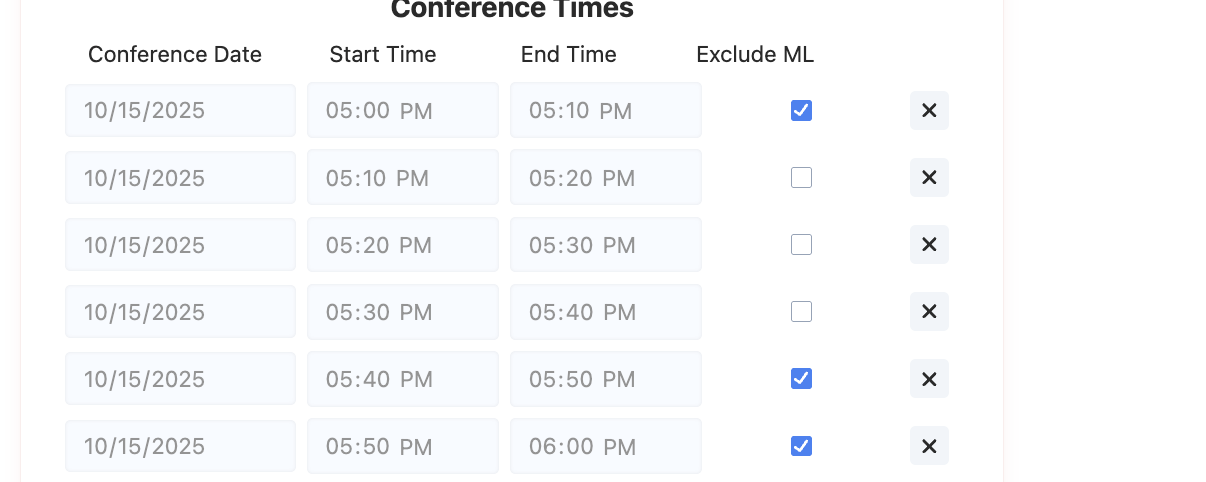
Hit save.
Now no ML interpreters will be available for those times.
Note: if you have ML conferences already scheduled, they will not be effected.
Was this article helpful?
That’s Great!
Thank you for your feedback
Sorry! We couldn't be helpful
Thank you for your feedback
Feedback sent
We appreciate your effort and will try to fix the article