In ReachMyTeach, each student is assigned one conference slot by default. However, some families may need additional time, especially in cases like co-parenting, extra discussion needs, or interpreter support. If a family requires more than one conference, they’ll reach out to you directly.
Steps to Handle Requests for Additional Conference Slots
-
Watch for Family Requests:
- Families who need more than one conference slot will contact you. They’ll let you know if they need extra time or specific accommodations.
-
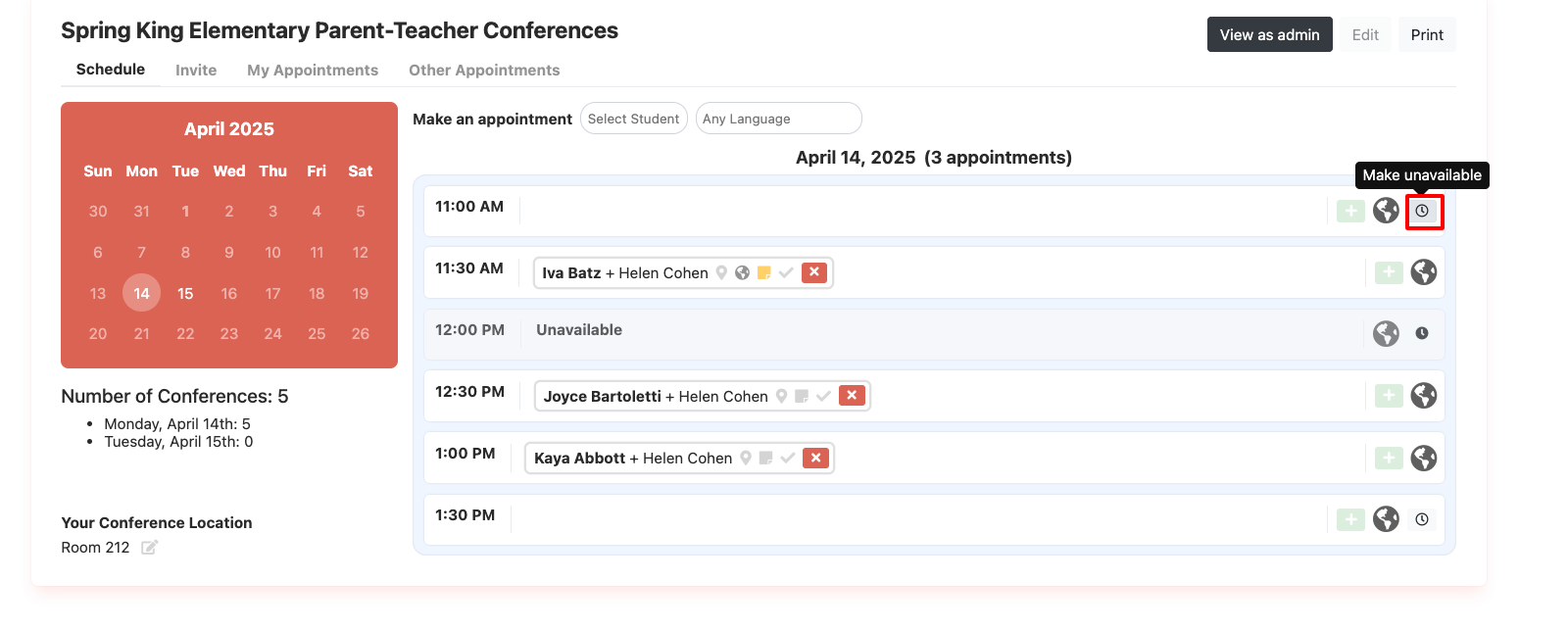
Block the Extra Slot in ReachMyTeach:
- Once a family reaches out, go to your conference schedule in ReachMyTeach and manually block an additional time slot to reserve it for them. This ensures they get the extra time they need and avoids overbooking.

-
Confirm the Reservation:
- After blocking the extra slot, send a quick confirmation to the family to let them know it’s reserved. This small step keeps communication clear and reassures families that their needs are being met, and in this circumstances automatic reminders are not being sent, so the family will need confirmation from the educator.
Was this article helpful?
That’s Great!
Thank you for your feedback
Sorry! We couldn't be helpful
Thank you for your feedback
Feedback sent
We appreciate your effort and will try to fix the article