Manually Add Single Teacher
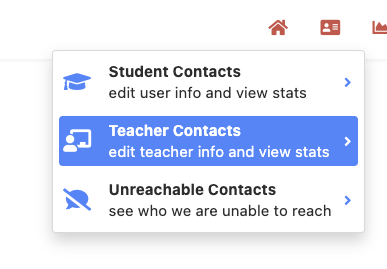
Begin by selecting teacher contacts in the upper right.
Then click the "+" button in the lower left. Here you can manually add a teacher.

Fill out the teacher's first name, last name, email, and connect them to external staff, to add a teacher to a school select the school or district option from the drop down.
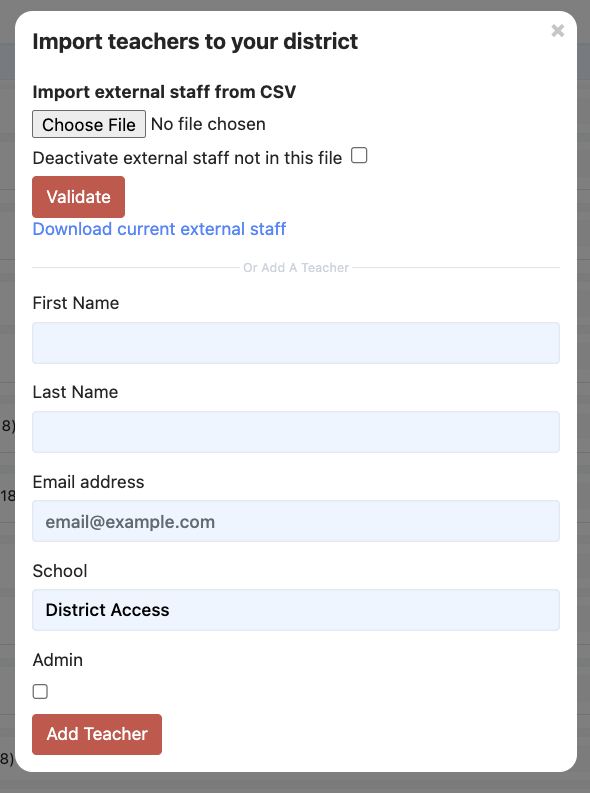 then select "add teacher". You can give them admin access click: Editing permissions: Granting educators different permissions or elevating to administrator to learn more about admin permissions.
CSV School-- uploading staff
To upload staff you click the "+" button in the lower left. Here you can manually add a spreadsheet.
Using our template spreadsheet you can upload staff. To learn more about the varying levels of staff click here.
When you upload the CSV you have the option of disabling any contacts not on the CSV, you can also download the current list of teachers before uploading. Choose your file and click validate.
The next page will give you a list of new and updated staff, as well as deactivated, and bad data.
Was this article helpful?
That’s Great!
Thank you for your feedback
Sorry! We couldn't be helpful
Thank you for your feedback
Feedback sent
We appreciate your effort and will try to fix the article