The All Scheduled Passes page contains a list of all the scheduled passes in the school.
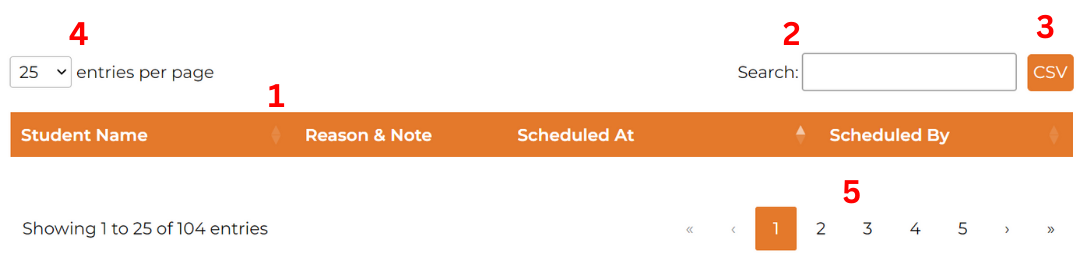
The table organizes and displays all student passes. The columns includes student name, reason & note, scheduled at, and scheduled by.
Features:
- Sorting: Click on the table headers to sort alphabetically by student, time scheduled, or who it is scheduled by.
- Search: Use the search bar to find specific students, schedulers, reasons, notes, or scheduled dates.
- CSV: Click the CSV button to download the current list of all scheduled passes.
- Entries per Page: By default, 25 scheduled passes are shown per page. You can adjust this to display 10, 25, 50, or 100 passes per page.
-
Change Page: If not all the scheduled passes you need to view are visible on the current table, you can navigate through different pages using the controls at the bottom:
-
Double Arrow: Click to jump to the first or last page.

-
Single Arrow: Click to move forward or backward one page at a time.

-
Page Number: Click on a specific page number to jump directly to that page.

- Highlighted Number: Shows the page you are currently on.
-
Double Arrow: Click to jump to the first or last page.
Interactive Elements:
- Links: Click on a student’s name to navigate to their statistics page.
Was this article helpful?
That’s Great!
Thank you for your feedback
Sorry! We couldn't be helpful
Thank you for your feedback
Feedback sent
We appreciate your effort and will try to fix the article