Elevate your communication with Writing Assistant for better clarity and translation accessibility. Participation in this feature is entirely optional, contingent on schools granting permission for teachers to utilize it.
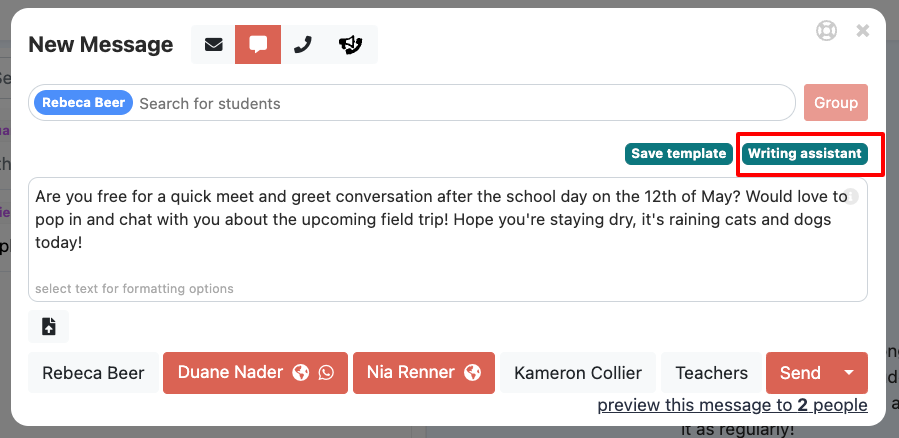
Craft your message, and once it's ready, click on the blue/green "Writing Assistant" This will enhance your message's professionalism and enhance its translatability by evaluating factors such as message length, clarity, and vocabulary.
After receiving a suggested rewrite of your message, you have two options: If you approve of the revised version, click "Confirm Suggestion"; if not, click "Cancel."*
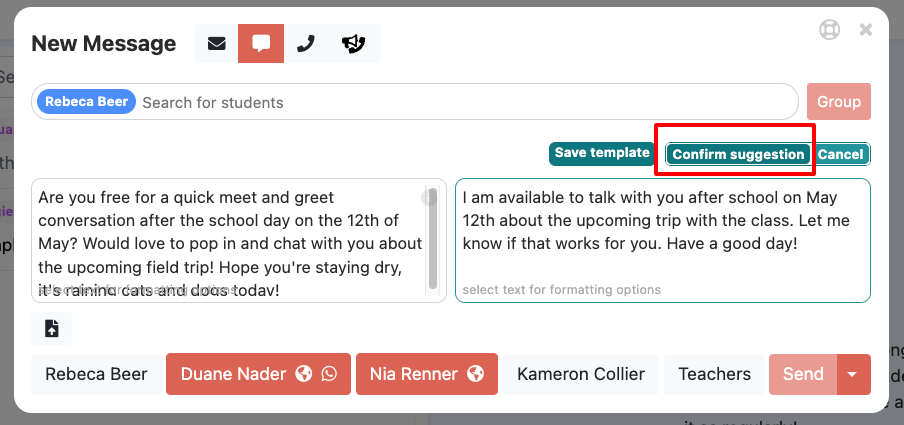
Upon confirmation, the message will be displayed, you can preview, and send.
*Note Writing assistant is machine generated and will not always accurately represent your communications, please read and be sure that the message matches your intentions.
Was this article helpful?
That’s Great!
Thank you for your feedback
Sorry! We couldn't be helpful
Thank you for your feedback
Feedback sent
We appreciate your effort and will try to fix the article