Community Contacts allows people who are not included in your Student Information System to receive school or district messages. These contacts might include community members, extended family members, volunteers, or others who are not listed as student guardians.
Your district can create custom groups and share a subscription link so people can sign themselves up for the messages they want to receive. Community Contacts can also be included in emergency broadcast groups.
Access Community Contacts
You must be a district administrator to access Community Contacts, and the feature must be enabled for your district.
Go to the Student ID Card.
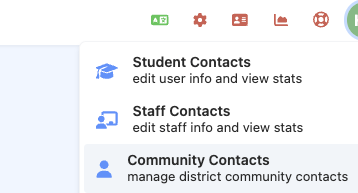
Select Community Contacts.
From this page, you can create and manage subscription groups and access the link to share with your community.
If you do not see Community Contacts, confirm that you are logged in as a district administrator. If you still do not see it, contact your ReachMyTeach representative to have the feature enabled.
Create a Subscription Group
Create a custom group for each type of communication people may want to receive, such as:
District announcements
School newsletters
Athletic updates
Community events
Emergency notifications
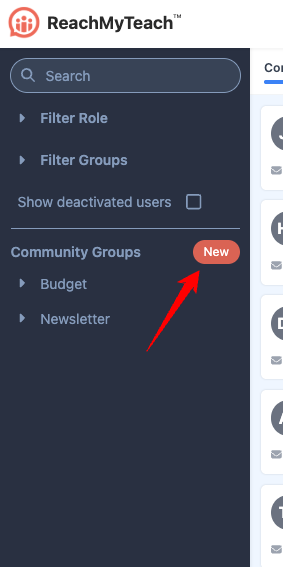
Once a group is created, share its subscription link with community members. People can use the link to add their contact information and subscribe without having a ReachMyTeach account or being listed in your Student Information System.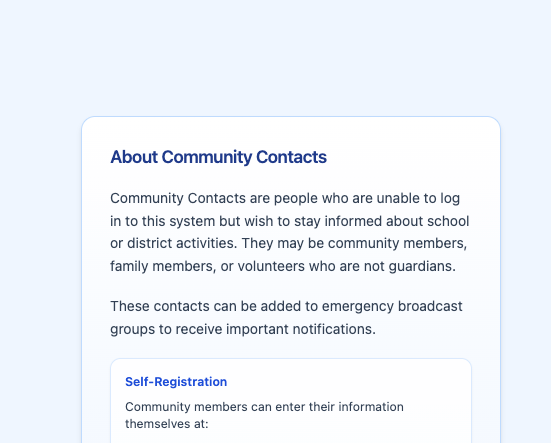
About Community Contacts
Community Contacts cannot log in to ReachMyTeach. Their information is used so they can receive messages from the groups they have joined or been added to.
Community Contacts should be used for people who want to stay informed but are not student guardians. Guardians should continue to be managed through your Student Information System.
Was this article helpful?
That’s Great!
Thank you for your feedback
Sorry! We couldn't be helpful
Thank you for your feedback
Feedback sent
We appreciate your effort and will try to fix the article