Family Chat gives families a secure way to send important updates to their student during the school day. It helps schools support phone-free classrooms while giving families confidence that time-sensitive changes can still reach their child.
How Family Chat Works
A parent or guardian can select their student and send a message from ReachMyTeach. Messages can include transportation changes, early pickup plans, appointment reminders, or other important updates.
If the family writes in a language other than English, ReachMyTeach automatically translates the conversation when staff need to help acknowledge the message.
Send a Message
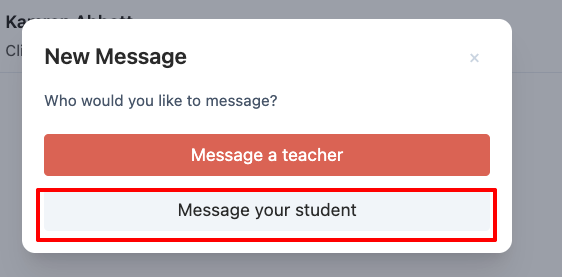
Log in to ReachMyTeach and the family is prompted if they are messaging a teacher or student.
Select the student who should receive the message.
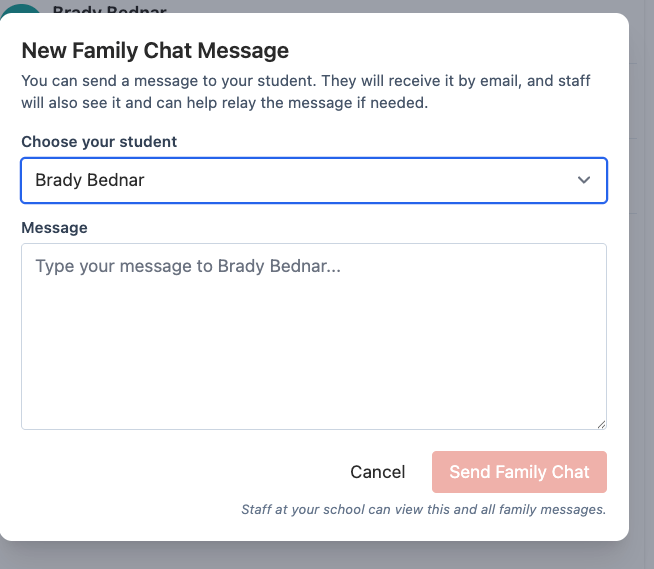
Write your message in the language you are most comfortable using.
Review the message and select Send. Review the message, choose whether to require an acknowledgement, and select Send. If acknowledgement is required, the student will be asked to confirm that they read the message. The message is also viewable to authorized staff, who can pass it along to the student.
What Happens After You Send a Message
If your student has access to ReachMyTeach, they can receive the message and acknowledge that they have seen it.
If your student is unavailable, a teacher, principal, or front office staff member can acknowledge that the message was shared.
Message Translation
Write your message in your preferred language. ReachMyTeach automatically translates the conversation when translation is needed, helping families and staff communicate clearly.
Common Uses for Family Chat
Bus or transportation changes
Early pickup plans
Appointment reminders
After-school pickup updates
Other important changes during the school day
Was this article helpful?
That’s Great!
Thank you for your feedback
Sorry! We couldn't be helpful
Thank you for your feedback
Feedback sent
We appreciate your effort and will try to fix the article