Administrator dashboards simplify the process of viewing data, exporting conversations, and monitoring contacts that cannot be reached. These administrator levels range from school-based to district-wide. Depending on your specific permissions, your dashboard will correspond to one of these levels.
To return to your dashboard at any time simply click Dashboard under the graph button to the left of your avatar.
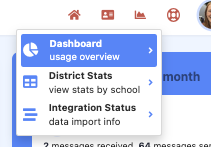
Elements of the administrator dashboard are:
- User Counts: Display the number of users categorized as administrators, educators, guardians, and students.
- Communication Totals: Show the total communication count for various types, including email, text, phone calls, WhatsApp, and Lexikeet (for schools with interpreter services enabled). This number reflects incoming and outgoing messages, excluding absence messages. This includes any communication from users (staff, students, families) within the district.
- Top Users: Highlight the most active users at either the school or district level, depending on the administrator's permission level.
- Engagement Metrics: Present engagement statistics, breaking down the percentage of staff, families, and non-English-speaking families involved in sending and receiving messages. Note that some staff may not have communication needs with parents.
- Message Breakdown: Provide data on messages sent from the school/district to families, internal staff messages within the school/district, and messages received from families; grouped messages (e.g., one message sent to 800 people) in this graph count as one outgoing message, the arrow pointing to the school building represents staff-only messages, and the arrow from the house to the school represents messages sent by families.
- Contact Data: Display information on recently edited contacts, as well as details on unreachable and invalid guardian contacts. Click on data for the option to download a spreadsheet.
- Top Languages: Identify the most frequently translated languages for messages.
- Message Export: Allow users to download their communications.
- Usage Trends: Offer insights into usage patterns over time, including data on group announcements versus individual messages within a class.
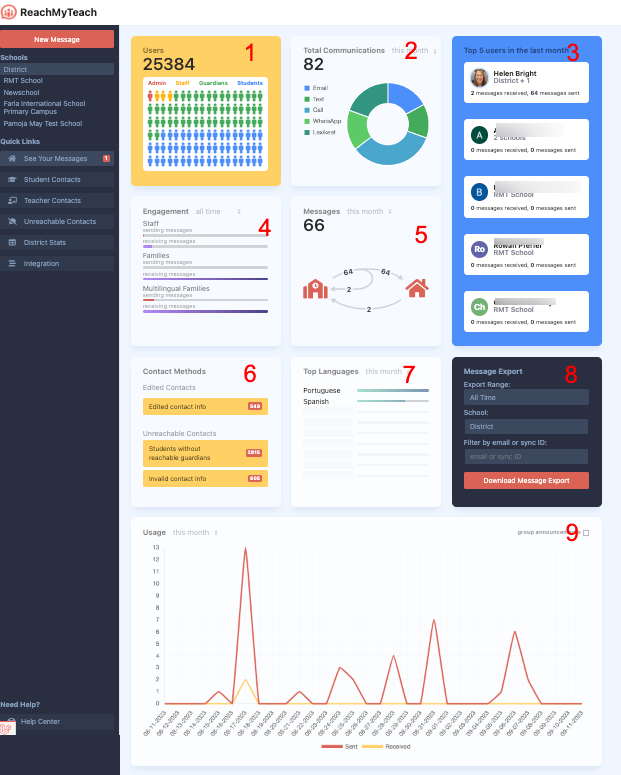
To see a greater breakdown by school you can click on district stats.
Was this article helpful?
That’s Great!
Thank you for your feedback
Sorry! We couldn't be helpful
Thank you for your feedback
Feedback sent
We appreciate your effort and will try to fix the article