What is an HTML message?
HTML messages let you send richly formatted content — like a newsletter — to your contacts. Instead of typing in the compose box, you paste raw HTML code, and recipients see the fully designed result.
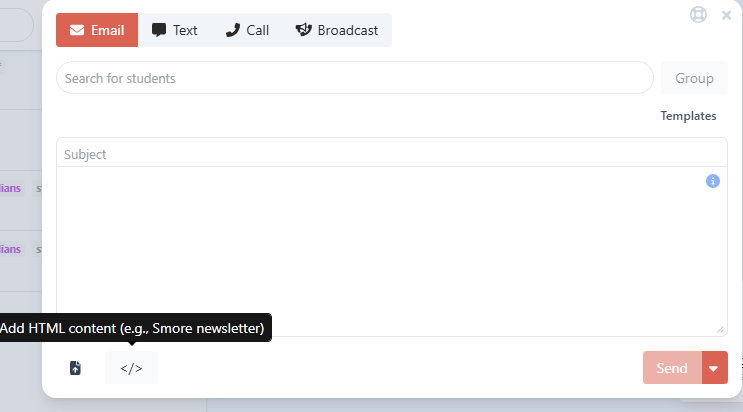
To add HTML content, click the </> button in the compose toolbar. A two-tab editor opens: use Edit to paste your HTML, and Preview to see how it will look before sending.
How recipients receive it
Email recipients see the full formatted HTML message rendered directly in their inbox — images, layouts, colors, and all.
Text/SMS recipients cannot receive HTML in a text message, so they receive a short notification instead:
Click to view your message about [subject] from J. Smith (Lincoln Elementary): [link]
Tapping the link opens the message in their browser, where the full HTML content is displayed.
Translation
HTML messages work a bit differently with translation:
Short HTML messages (under 8,000 characters): the notification text sent to SMS recipients is translated into the recipient's preferred language.
Long HTML messages (over 8,000 characters): the message will not be automatically translated when sent. This is a noted limitation — keep it in mind if your audience includes families with non-English language preferences.
Using S'more newsletters
The HTML editor is designed to work great with S'more newsletters. If you've created a newsletter on S'more, simply copy its HTML and paste it into the editor.
There are a couple of things worth knowing when using S'more content:
For text recipients: Instead of a generic link to our viewer, the system detects the S'more content and sends recipients a direct link to your newsletter on S'more's site (e.g., app.smore.com/n/...). If the recipient has a non-English language preference set, a translation parameter is automatically added to that link.
Translation on S'more: S'more has its own built-in translation feature on their end. Recipients who open the S'more link can use S'more's translation tools directly, which is why long S'more newsletters aren't additionally processed by our translation system.
Was this article helpful?
That’s Great!
Thank you for your feedback
Sorry! We couldn't be helpful
Thank you for your feedback
Feedback sent
We appreciate your effort and will try to fix the article